
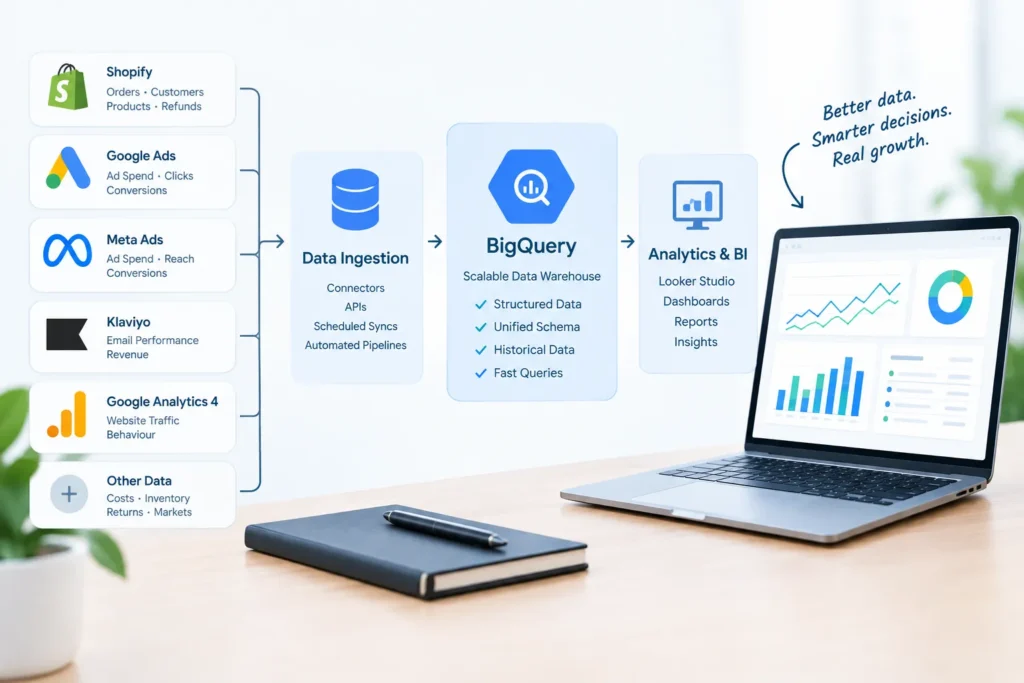
A Singapore skincare brand on Shopify is processing around nine thousand orders a month across Singapore, Malaysia, and Australia. The founder’s Monday routine is to export orders from the Shopify admin, paste them into a Google Sheet, and combine them with separate exports from Meta Ads and Google Ads. It takes most of a morning. The sheet has grown to fourteen tabs, two of which nobody remembers building, and it breaks whenever a column name changes. When the marketing manager asks which products bring customers back for a second purchase, the answer is that someone will need to check — because Shopify’s reports show orders and sales, but joining them to customer history, ad spend, and returns needs more than the admin can offer.
The business does what many growing Shopify brands do next: it connects Looker Studio directly to a Shopify connector. The dashboards load, though slowly, and the numbers differ from the Shopify admin by a few percent. Nobody can explain by how much or why, because refunds, discounts, and currency conversion are each handled differently in each place. The team has moved from a spreadsheet problem to a dashboard problem without solving the underlying issue, which is that there is no analytical foundation between Shopify and the reports.
This article covers how to build a Shopify BigQuery analytics stack that scales — how data leaves Shopify, how it should be modelled, how it joins with marketing data, and how to keep it affordable as volumes grow. It draws on the approach used by Engine Analytics, a data analytics company in Singapore that builds analytics infrastructure for ecommerce and SaaS businesses.
Shopify’s analytics are designed for running a store, and they do that job well: orders, sales, traffic, and conversion are all a click away. The limits appear when the questions get broader. The depth of built-in reporting depends on the Shopify plan, and even at the top tier the reports are shaped around Shopify’s own definitions. They cannot easily combine store data with ad spend from other platforms, product costs, email performance, or a customer’s full history across years and markets. Each connected app also reports its own version of the truth — Klaviyo, Meta, and Google each claim revenue on their own terms.
A data warehouse is where those separate views are joined into one. It does not replace Shopify’s reporting; it sits beside it and answers the questions Shopify cannot, such as which first-purchase products lead to repeat orders, what a customer acquired through a particular channel is worth after twelve months, or what contribution margin looks like after discounts, returns, and shipping. BigQuery is a common choice for Shopify businesses because it is serverless, sits comfortably alongside Google Analytics 4 and Google Ads data, and has a Singapore region for teams that want data held close to their customers.
There are four ways to move Shopify data into BigQuery, and they are not equally good. Manual CSV exports are not a pipeline; they are a habit, and they fail the moment the person doing them is away. A managed connector from an ELT tool is the fastest route for most stores — it handles authentication, schema changes, and incremental syncing without custom code, though its cost grows with data volume. A custom extraction using Shopify’s GraphQL Admin API, including its bulk operations for large historical pulls, offers more control at the price of more maintenance. Webhooks can push events in near real time when a specific use case, such as stock alerts, needs speed that a daily sync cannot give.
For most businesses the right answer is a managed connector for the core objects and custom extraction only for gaps the connector does not cover. Whichever route is chosen, one design point matters more than the tool: Shopify orders change after they are created. Refunds, cancellations, fulfilment updates, and edits all modify an order days or weeks later, so a pipeline that only picks up new orders will slowly drift away from the truth. The sync should track updates, not just creation dates, and the raw data should land untouched so that any later modelling error can be traced and corrected without re-extracting from Shopify.
Raw Shopify tables are not ready for reporting. A well-structured setup transforms them in layers: a staging layer that renames fields, sets data types, and standardises currency and time zones, followed by business-logic tables — orders, order lines, customers, products, and refunds — that every report reads from. The most common cause of wrong revenue figures is joining at the wrong grain. An order has one shipping charge but several line items; join the two carelessly and the shipping is counted once per line. Deciding, and documenting, what one row in each table represents removes an entire category of error.
Three definitions need to be settled before the first dashboard is built. The first is customer identity: Shopify assigns customer IDs, but guest checkouts and changed email addresses fragment the picture, so most stores adopt a clear rule such as a normalised email address. The second is revenue: gross sales, discounts, returns, shipping, taxes, and net sales are different numbers, and finance and marketing usually mean different ones. The third is currency: Shopify records both the customer-facing currency and the shop currency, and a multi-market brand needs one consistent reporting currency. The principles behind documenting these decisions are covered in the article on data engineering for business leaders.
The real value of the warehouse appears when Shopify orders are joined with the rest of the marketing picture. GA4’s BigQuery export provides event-level data, which can be matched to Shopify orders through the transaction identifier. Ad spend and click data from Google Ads, Meta, and other platforms lands through scheduled connectors, and email performance from tools such as Klaviyo can follow the same route. Together they support the blended measures leadership actually needs — marketing efficiency ratio, blended customer acquisition cost, and channel contribution — calculated from actual orders rather than platform claims.
This is also the foundation for proper channel attribution, which needs touchpoint data from every source in one place. The framework in our article on attribution modelling for marketing teams builds directly on the joined Shopify, GA4, and ad data described here. One practical note: the GA4 export and the rest of the warehouse need to sit in the same BigQuery location, because BigQuery cannot join datasets held in different locations. Choosing the location once, at the start, avoids a painful migration later.
BigQuery charges for storage and for the data scanned by queries, and at the time of writing it includes a monthly free tier that covers small workloads. Costs stay predictable when a few habits are built in from the start. Large tables should be partitioned by date and clustered on the columns most often filtered, so queries scan only what they need. Dashboards should read from the modelled business-logic tables, not from raw data. Heavy transformations should be materialised as tables and, for large event data, built incrementally so that each run processes only new records. Budgets and alerts should be configured so that a badly written query is noticed on the day rather than on the invoice.
Scale is also an ownership question. As the number of models and dashboards grows, someone has to know what depends on what, which tables are tested, and when data last refreshed. Monitoring that alerts on failed loads, unexpected drops in order volume, or stale tables is what keeps a growing stack trustworthy. For most Shopify businesses a daily refresh is entirely adequate; the piece on real-time analytics covers the few cases where faster data movement is worth the added cost.
A scalable Shopify analytics stack has five parts, each with a clear job. Shopify and connected apps are the sources. An ingestion layer moves their data into BigQuery on a schedule, landing it raw. A transformation layer, usually SQL managed with a tool such as dbt, cleans and models it into orders, customers, products, and marketing tables with documented definitions. Audience-specific dashboards — one for marketing, one for finance, one for operations — read from those tables. And monitoring watches the whole chain. The result is that every number can be traced back to a Shopify order, and every team quotes the same figure for the same metric.
If your Shopify reporting depends on spreadsheets, dashboards that disagree with the admin, or exports that only one person knows how to run, the path forward starts with the data layer rather than another dashboard. View our data and AI services, explore our engagement plans, see what we have built in our project portfolio, or get in touch and we can review your current setup and outline what a scalable Shopify and BigQuery foundation requires for your store.
Engine Analytics is a data analytics company in Singapore that builds the data foundations — warehouse, models, and audience-specific reporting — that growing ecommerce businesses need to move from spreadsheet exports to numbers they can trust.
Not necessarily. For a store with modest order volumes and simple questions, Shopify’s reports combined with GA4 may be enough. The tipping point comes when decisions depend on joining sources, on customer-level history, or on numbers that finance and marketing both accept. BigQuery’s free tier at the time of writing covers small workloads, so the cost of starting is usually the setup work rather than the platform.
For most stores, a managed ELT connector is the best starting point because it handles authentication, schema changes, and incremental syncing without custom code. Custom extraction through the Shopify Admin API makes sense for data the connector does not cover or where cost at high volume becomes a concern. Whichever is used, the pipeline should track order updates, not just new orders, and land raw data untouched.
Yes. We design and build the full stack — Shopify ingestion, the BigQuery warehouse, modelled orders, customers, and product tables, marketing data integration, monitoring, and audience-specific dashboards. Get in touch via the Engine Analytics contact page to start with a review of your current reporting.
— Engine Analytics | Singapore’s data and AI consultancy — building the analytics foundations that let ecommerce teams grow past spreadsheets and make decisions from numbers they trust.
